
Short answer
Before buying a digital art frame, test whether its app can install on your phone, upload a whole album, control the way images fit, share the frame with another person, and keep doing the jobs you need when the internet is unavailable. Then check what requires a subscription and how you would recover after replacing your phone. These everyday operations determine whether the frame stays useful after the first week.
A beautiful panel cannot fix a playlist that is painful to edit. Use the twelve tests below on the exact frame model, phone platform and software version you intend to buy. A feature promised for a future update should remain an unanswered item on your list.
Why we built this checklist
We reviewed an archive of public buyer comments from five crowdfunding projects, captured on June 19, 2026. Our August 31 topic workbook contains 489 buyer-labelled records after creator replies were excluded. Its app, software, account and Wi-Fi category has 84 tagged records associated with 60 distinct commenter labels. Buyers ask about missing bulk selection, different libraries on desktop and mobile, regional app availability, and family members who cannot see existing playlists.
Those numbers describe the archive, not a failure rate. The tags overlap, some raw records contain repeated or concatenated thread text, and commenter labels are not verified customer identities. Around four fifths of the overall archive comes from one project. Crowdfunding discussions also attract people seeking help. We use the material to identify questions worth testing, rather than to rank brands or estimate how often a problem occurs.
There are positive experiences in the same material: buyers describe easy setup, working iPhone apps and enjoyable image changes. One also reports finding the bulk-selection route after initially missing it. A complaint can therefore reveal an unclear interface, a platform difference or an older software version, as well as a missing feature. The useful response is a reproducible test.
einksmart sells a content platform, so we have a commercial interest in this subject. Apply this checklist to us too. It is buyer guidance, not a statement that every einksmart model currently supports every function.
The twelve checks at a glance
Bring your own phone, a second account and a small album of non-sensitive test images. Include a portrait, a landscape, an image with text near the edges and a photograph you know well. Keep the original files outside the app. Save the exact model, app version, firmware version and test date with your results.
| Check | What to demonstrate | Evidence to keep |
|---|---|---|
| 1. Installation | Install from your normal store account | Store link and supported OS |
| 2. Setup | Pair and reconnect on your intended network | Network requirements |
| 3. Bulk upload | Import an album and retry an interrupted upload | File count and error list |
| 4. Library consistency | Find the same images from mobile and desktop | Storage and sync explanation |
| 5. Playback | Set order, shuffle and change interval | Actual playback behaviour |
| 6. Fit and crop | Display a portrait and landscape without losing faces | Photographs of the panel |
| 7. Family sharing | Invite and remove a separate account | Permission and deletion rules |
| 8. Offline operation | Try display, rotation and new upload separately | Result for each operation |
| 9. Costs | Identify free and paid everyday functions | Dated feature and fee list |
| 10. Privacy | Limit photo access and locate deletion controls | Data locations and policy |
| 11. Recovery | Use a replacement phone and change networks | Recovery procedure |
| 12. Support | Find release notes and a continuing-use route | Support and offline documentation |
This is a practical test checklist compiled by einksmart. It is not a product certification or a vendor score.
1. Can you install the app where you live?
Open the manufacturer's official store link on your own phone before paying for the frame. Confirm the developer name, minimum operating-system version and availability using the account you normally use. If the frame is a gift, repeat the check on the recipient's phone. A screenshot from the seller's phone does not establish that the recipient can install it.
Country availability is a real distribution setting. Google's developer documentation explains that production releases can target specific countries and that targeting uses the user's Play country, rather than their current physical location. Shipping the hardware to a country does not by itself prove app availability there.
Pass: the official app installs and opens on the intended device. If the seller offers a web interface or another installation method, ask how it receives updates and whether it has the functions you need. Record that route separately instead of assuming it is identical to the store app.
2. Does setup work on your actual network?
Ask which Wi-Fi bands and authentication methods the exact model supports, and whether Bluetooth is used for pairing, waking the frame or transferring images. These are different jobs. “Wi-Fi enabled” leaves all of them unresolved.
Test setup on the network you plan to use. Mixed-band home networks, guest isolation and workplace or hotel sign-in pages can create different conditions from a showroom router. Request the supported network configuration rather than weakening your normal network to make a demo work. Where you cannot test the actual location, obtain its requirements and a suitable return arrangement.
Pass: the device connects, reports a useful error when setup fails, and reconnects after an ordinary router restart. Close the phone app and confirm the intended playback continues. A frame that only changes pictures while the phone stays beside it may still suit you, but you need to know that before mounting it.
3. Can you upload an album without selecting every image?
Try an album of around twenty test images first. Check for multiple selection, select all, progress indicators, failed-file reporting and a sensible way to retry. Interrupt one transfer and see whether the app resumes or creates duplicates. If you intend to keep hundreds of photographs, ask for a demonstration with a library of comparable size.
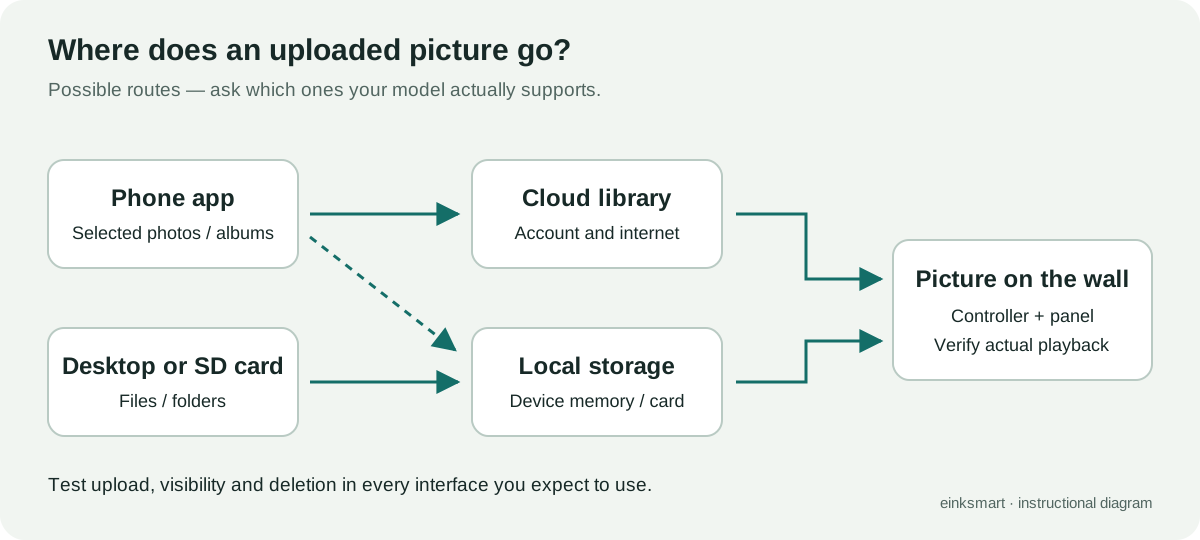
Test the import route you will actually use. A phone gallery, a cloud photo picker and a desktop folder may expose different selection controls. Check your normal file formats too. A frame may accept JPEG while requiring conversion for HEIC or other formats. The file picker accepting an image does not prove that it reaches the panel correctly.
Pass: you can add, identify and remove a batch without repeating a separate operation for every file. If the app has no folders but its playlists can organise your collection, test that workflow. A clear alternative can be sufficient; a button labelled “library” is insufficient evidence.
4. Do the phone, desktop and frame show the same library?
Upload three images from the phone and three through the desktop or removable-storage route, if supported. Name them so you can recognise the source. Reopen both interfaces and inspect the frame's library. Then delete one test image and check what disappears from each place.
This catches a subtle distinction: a desktop tool may browse files directly on a memory card while a phone app only lists cloud uploads. Both interfaces can work correctly yet provide different views. Ask which location owns each image and whether a playlist can combine the sources.
Pass: the behaviour matches your intended workflow and is explained in the documentation. Full synchronisation is convenient, but an explicit local-only library can also work. What causes trouble is discovering that your second device cannot find or manage the collection you already uploaded.
5. Can you control order and timing?
Create a numbered set of images and try ordered playback, shuffle and any schedule you need. Ask whether shuffle means a random choice each time, a shuffled cycle or another algorithm. Repeated images alone do not establish that random playback is broken, especially with a small test library.
Official documentation can make these differences explicit. For example, Aura describes shuffle and chronological modes, notes that shuffle need not give every image equal frequency, and explains that changing modes can take time to reach the frame. That is an example of documented behaviour, not a claim that all frame models use the same system.
For colour E-Ink, watch a complete refresh and choose an interval that suits a wall picture. Fast LCD-style slideshows may be distracting on a reflective panel. Our E-Paper versus digital photo frame comparison explains that difference.
Pass: the real panel follows the chosen behaviour, including after the app closes. For a schedule, also check local time, daylight-saving changes and what happens after a restart.
6. Can you preserve a portrait and a landscape?
Upload both orientations, including a face or text close to an edge. Find the difference between fit, fill and crop. Fit normally preserves the complete image with unused space where ratios differ. Fill uses the available area but can crop the edges. A manual crop lets you decide what to remove. Rotating the picture is separate from rotating the physical frame.
Compare the preview with a photograph of the actual display. Confirm that the crop persists after changing the playlist and that the app knows the mounted orientation. A size expressed in inches tells you the diagonal, not which photo proportions fit. Use the resolution and orientation information in our large-display guide as a starting point.
Pass: you can keep meaningful content visible, or the seller gives a precise supported preparation method. Rendering the complete image with borders can be preferable to filling the panel. Check colour expectations separately using our guide to real colour E-Ink appearance.
8. What still works without the internet?
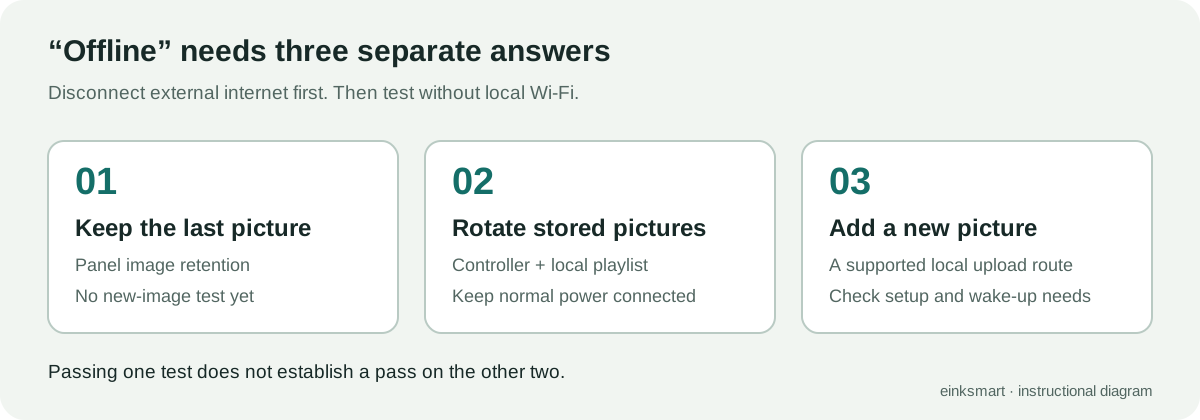
Test three operations separately: retaining the current picture, changing among stored pictures, and adding a new picture. An E-Ink panel retaining its last image does not prove that the frame can rotate images or accept uploads offline. The panel's image retention and the controller's ability to run software are separate.
First disconnect the internet connection while keeping the local router running. This distinguishes cloud dependence from local-network capability. Next, test with the local network unavailable. Keep normal power or the battery connected for these tests; a powerless panel retaining a picture is a different case. Ask whether Bluetooth or SD-card transfer remains usable and whether a sleeping device needs an app or server to wake it.
| Operation | What it proves | What it does not prove |
|---|---|---|
| Last image remains | The panel retains its displayed image | Working schedules or uploads |
| Stored images rotate | The controller can play local content | Local import of new files |
| New image uploads locally | An upload route works without external internet | Recovery without an account service |
| Device restarts offline | That restart does not require an online service | Setup after a factory reset |
Pass: the required operations work under the relevant condition. An initial setup, device restart and factory reset can have different requirements. Never reset a device holding valued photos just to test a sales claim; ask for a separate demonstration unit.
9. Which everyday functions require payment?
Request a dated feature list separating hardware ownership from app services. Identify fees for uploading your own files, playlists, family accounts, storage, artwork collections, AI generation and remote management. “No subscription required” can mean basic operation is free while another function you need is paid.
Ask what happens when a trial or subscription ends. Does your own uploaded content remain usable? Do schedules stop? Can you add new images? A demonstration account with premium access does not answer those questions for the base version.
Pass: the seller explains the cost of your actual workflow and the effect of cancellation. Calculate any recurring charges over the years you expect to keep the frame. A frame can be worthwhile even with a paid service, as our category guide discusses, but include that service in the purchase decision.
10. Where do your images go?
Use non-sensitive photos during the demo. Check whether the app works with selected-photo access or requires your entire phone library. Ask whether originals, converted display files or both are sent to a cloud service, and whether remote access can be disabled.
Locate controls for removing a photo from playback, deleting the uploaded copy and deleting an account. These can be separate actions. Removing an image from a playlist does not establish that the file has been erased elsewhere. Read the vendor's policy for retention and deletion details.
Pass: you understand the storage locations, who can see the frame library and what each deletion control does. For workplace use, ask how access is revoked when someone leaves and how frames are reassigned. Those are practical content-management requirements, especially where the frame is visible to visitors.
11. Can you recover after changing phones or routers?
On a test setup, log in from a second phone with the owner's account and confirm that the frame and expected library appear. Check whether crop settings and schedules survive. Ask how to change the Wi-Fi network without deleting the content, and what happens if the owner loses account access.
Record whether the frame needs to be nearby for recovery. A relative helping remotely may be able to change a playlist but unable to configure a new router. For a gift, leave an account and recovery arrangement the recipient can actually manage.
Pass: the documented recovery procedure matches the purchase situation. A full reset may be reasonable for transferring ownership, but it should not be the unexplained answer to every connectivity problem. Keep your original image files independently; a frame library is a display collection, not your only backup.
12. What is the continuing-use plan?
Find the latest mobile and desktop release notes, supported operating systems and a support contact. Ask whether update delivery depends on a working account service and what the manufacturer commits to supporting. A recent update is useful evidence of activity; it does not guarantee a future support period.
Then ask a specific longevity question: “If the app or cloud service became unavailable, how would I add another picture?” Request a demonstrated local route or documented limitations. An SD slot, Bluetooth radio or an advertised API does not establish that complete workflow. Local automation also needs a way to reach or wake the controller and permission to transfer an image.
Pass: the supported route is documented, or you knowingly accept the service dependence. Treat an undated roadmap as future work. The physics behind E-Ink image retention can preserve a picture for a long time; keeping the product editable needs a functioning content route.
Choose the checks that matter for your room
You do not need every feature. A single artwork changed occasionally can work well with a simple local uploader. A gift managed by distant relatives needs straightforward sharing and recovery. A managed content wall needs predictable permissions and schedules. Decide what matters before the demo, so an attractive extra cannot distract from a missing essential.
| Your use | Checks to prioritise | A reason to pause the purchase |
|---|---|---|
| One artwork changed occasionally | Upload, fit and continuing use | No usable route to add your own image |
| Family photo rotation | Bulk upload, playback and sharing | Repeated manual work you will avoid doing |
| A gift supported remotely | Installation, permissions and recovery | Recipient cannot install or regain access |
| Home with unreliable internet | Separate offline operations | Required rotation or upload needs the cloud |
| Reception or hospitality wall | Roles, scheduling and network fit | No control over who changes public content |
For a showroom visit, run the quick checks in roughly half an hour and arrange a longer trial for schedules, reconnection and large libraries. Mark each requirement as demonstrated, documented but untested, unsupported or promised. Do not add up a numerical score that hides an essential failure. For a commercial pilot, the hotel lobby playbook provides a longer evaluation structure.
Send the seller your phone model, operating system, region, network conditions and required content workflow. Ask for a short recording showing those tasks on the exact product. The app becomes much easier to judge when the demonstration uses your everyday work.
FAQ
Do all digital art frames need an app?
No. Some offer desktop, web or removable-storage routes, while others require an app for setup or ongoing management. Check the exact model and distinguish initial setup from later image changes.
Will an E-Ink frame still work without Wi-Fi?
Its last image can remain visible without a Wi-Fi connection, but stored-image rotation and new uploads depend on the controller and software. Test those operations separately with external internet and local Wi-Fi unavailable.
Does an SD-card slot guarantee offline uploads?
No. The device must support the card format and image files, and its software must be able to import or play them without an online service. Ask for an actual offline transfer demonstration.
Can two people share a frame without sharing a password?
Some systems support invitations to separate accounts. Check what each member can view, edit or delete, and what happens to their images when access is removed.
Why do my phone and desktop show different pictures?
They may be viewing different storage locations, such as cloud uploads and an SD-card library. Check the storage and synchronisation rules, then upload and delete test files from both interfaces.
What if the frame app stops receiving updates?
An existing installation may continue working, but future phone compatibility, account access and cloud services are not guaranteed. Keep original files separately and request a documented continuing-use route before buying.
Should I pay for AI features or an art subscription?
Choose them if their content is useful to you, after checking your basic upload, crop, playback and sharing needs. Confirm recurring fees and what remains available when the paid service ends.
Next step
Are digital picture frames still worth it?
We read 489 buyer comments. The biggest problem is not the technology.
Read Insight
What colour E-Ink looks like
Dithering, paper-white and room light: what to expect before it is on your wall.
Read Insight
Best color E-Ink photo frames of 2026
Spectra 6 frames compared by panel, price, battery, app and room fit.
Read Insight